Your app is down. Not degraded — fully down. The on-call alert fires at 2:47 AM, and by the time you’re staring at your laptop, you have seventeen messages in Slack from your largest customer. Their team can’t book any appointments. Revenue is pausing in real time.
You check your servers. They’re healthy. CPU is normal. The application logs look fine. You spend forty minutes chasing a ghost inside your own infrastructure before a colleague asks: “Did you check DNS?” You hadn’t. It turns out your DNS provider had a partial outage, and about 40% of users couldn’t resolve your domain at all. The other 60% were hitting a stale cache from earlier in the day.
This is the tax you pay for not deeply understanding the infrastructure underneath your application. The internet is not magic — it’s a stack of specific, well-defined protocols, each one solving a distinct problem, each one with its own failure modes. If you can’t trace a request from keyboard to server and back, you will eventually spend a 2:47 AM debugging something that should have been obvious.
This article changes that. We’ll walk through every layer, with real numbers for every hop, so the next time something breaks — and it will — you’ll know exactly where to look.
What We’ll Cover
- What actually happens when you type a URL
- DNS: Translating names to addresses
- TCP/IP: How data actually moves
- HTTP vs HTTPS: The conversation layer
- HTTP/2 and HTTP/3: Fixing HTTP’s performance problems
- Latency vs throughput: Two different problems
- CDNs, proxies, and load balancers: The infrastructure layer
- Trade-offs & when this matters
- Real-world scenario: One page load, every hop
- Common mistakes engineers make
- How this shows up in interviews
- Key takeaways
What Actually Happens When You Type a URL
At the simplest level, a URL is just a human-readable name for a resource on a computer somewhere on the planet. Everything that follows is the internet’s machinery for turning that name into bytes on your screen.
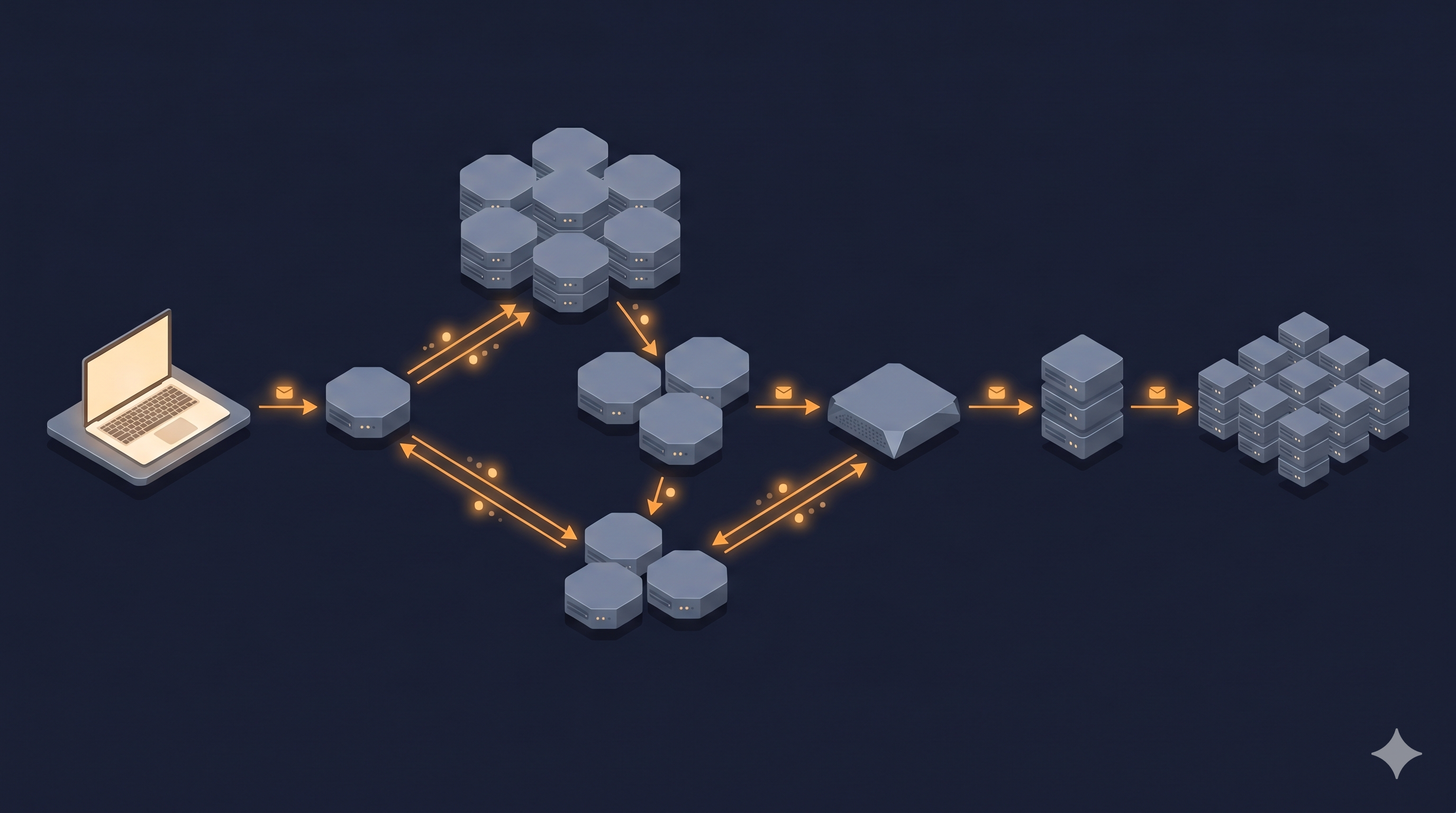
When you type https://booking.example.com/appointments and hit Enter, your browser starts a multi-stage process:
- Parse the URL into its parts: scheme (
https), hostname (booking.example.com), path (/appointments) - Check if it already knows the IP address for
booking.example.com(browser cache, OS cache) - If not, ask DNS to look it up
- Open a TCP connection to that IP address on port 443
- Perform a TLS handshake to establish an encrypted session
- Send an HTTP request over that encrypted connection
- Receive the HTTP response
- Parse and render the HTML, then repeat steps 2–7 for every asset (CSS, JS, images)
That’s the sequence. Now let’s understand each step well enough that you could implement it.
DNS: Translating Names to Addresses
DNS (Domain Name System) is a globally distributed database that maps human-readable domain names to IP addresses. Think of it as the internet’s phone book — except the phone book is replicated across thousands of servers worldwide, cached aggressively, and has a hierarchy that makes the whole system fast enough to be invisible.
The hierarchy
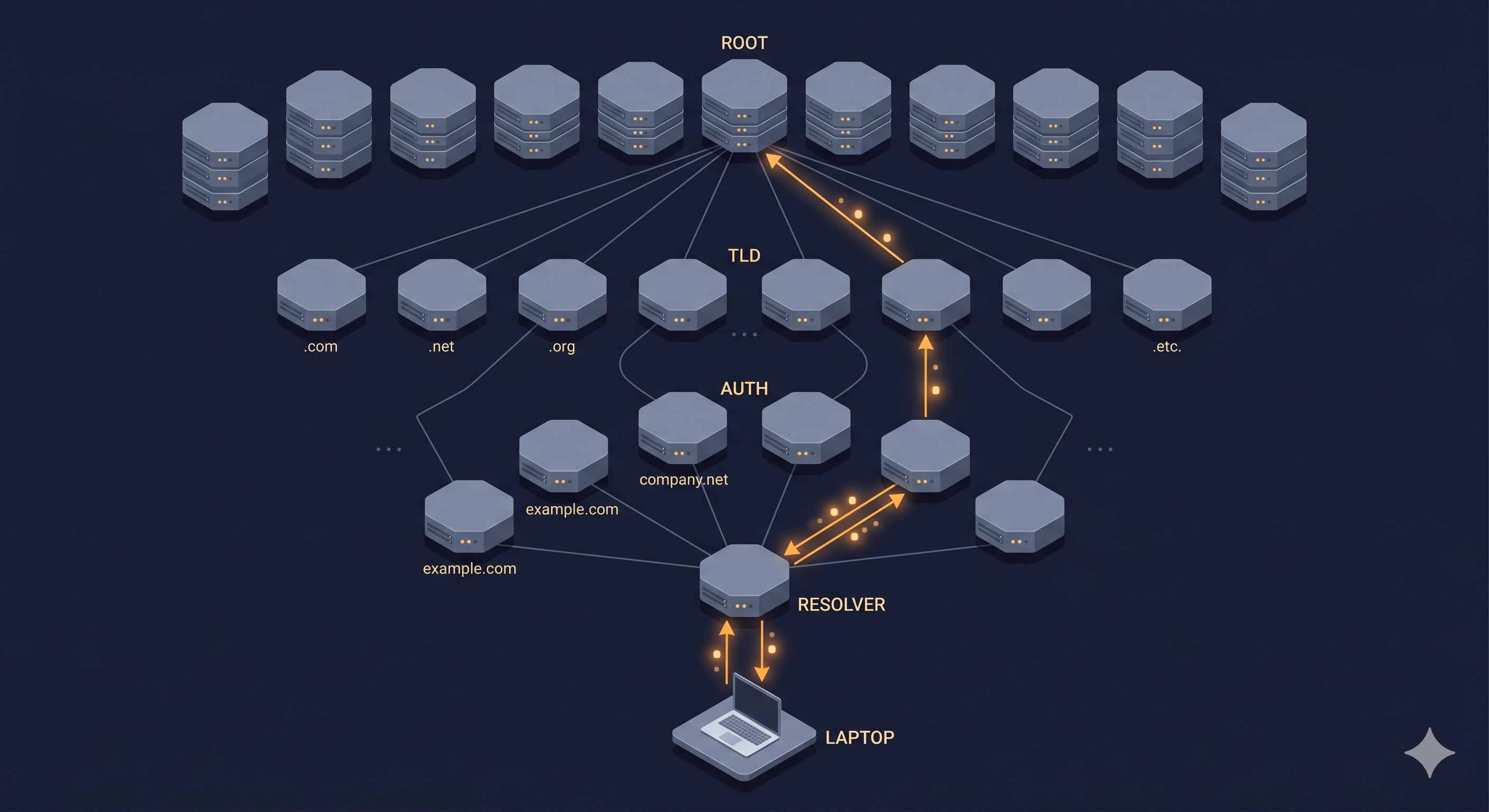
DNS is organized in a tree structure with four types of servers you need to know:
- Root nameservers — 13 logical roots (run by organizations like ICANN, Verisign, NASA). They know which server is authoritative for each TLD.
- TLD nameservers — Handle
.com,.org,.io, etc. They know which server is authoritative for each domain within that TLD. - Authoritative nameservers — The source of truth for a specific domain (e.g.,
example.com). This is the server your DNS provider controls. - Recursive resolvers — Your ISP or a public resolver like
8.8.8.8(Google) or1.1.1.1(Cloudflare). This is the server your laptop actually talks to.
The resolution process
sequenceDiagram
    participant B as Browser / OS Cache
    participant R as Recursive Resolver (1.1.1.1)
    participant Root as Root Nameserver
    participant TLD as TLD Nameserver (.com)
    participant Auth as Authoritative NS

    B->>R: Who is booking.example.com?
    R->>Root: Who handles .com?
    Root->>R: a.gtld-servers.net
    R->>TLD: Who handles example.com?
    TLD->>R: ns1.cloudflare.com
    R->>Auth: IP for booking.example.com?
    Auth->>R: 93.184.216.34
    R->>B: 93.184.216.34 — cache 300s
The recursive resolver does all the work. Your browser just asks it once and waits. This is why if your recursive resolver goes down (or gets poisoned — but that’s a security article), your internet stops working even though every other server is healthy.
TTL and caching
Every DNS record has a TTL (Time-To-Live) — a number in seconds that tells resolvers how long to cache the result. A TTL of 300 means “ask me again in 5 minutes.” A TTL of 86400 means “this answer is good for 24 hours.”
This is where the 2:47 AM scenario comes from. When you change your DNS record, not everyone sees it immediately — they see their cached version until the TTL expires. This is why:
- Low TTL (
60–300) = faster propagation when you make changes, but more DNS queries hitting your authoritative servers - High TTL (
3600–86400) = DNS is fast and cheap for users, but changes take hours to propagate
⚠️ Warning: If you’re planning a migration or failover that requires a DNS change, lower your TTL to 60 seconds at least 24 hours beforehand. Otherwise you’ll be waiting a full day for stale cache to expire across the internet.
Latency at this hop: A cached DNS lookup in your OS or browser takes ~0ms. A full recursive resolution (all four hops above) takes 20–120ms depending on where the nameservers are. Public resolvers like 1.1.1.1 typically answer in ~10ms from most of the world due to anycast routing.
TCP/IP: How Data Actually Moves
Now that you have an IP address, you need to actually connect to that server and exchange data. This is where TCP/IP comes in.
IP (Internet Protocol) handles addressing and routing — how packets find their way from your machine to the destination, hopping through dozens of routers along the way. It’s fundamentally unreliable: packets can arrive out of order, get duplicated, or disappear entirely.
TCP (Transmission Control Protocol) sits on top of IP and adds reliability guarantees: ordered delivery, no duplicates, error detection, and retransmission of lost packets. That reliability isn’t free.
The three-way handshake
Before you can send any data over TCP, you must establish a connection:
sequenceDiagram
    participant C as Client (Browser)
    participant S as Server (booking.example.com)

    Note over C,S: TCP Three-Way Handshake (~1 RTT)
    C->>S: SYN (seq=1000)
    S->>C: SYN-ACK (seq=2000, ack=1001)
    C->>S: ACK (ack=2001)
    Note over C,S: Connection established. Ready to send data.
RTT (Round-Trip Time) is the time for a packet to travel to the server and for the acknowledgment to come back. If your server is in Frankfurt and your user is in New York, a typical RTT is ~80ms. The TCP handshake costs you one RTT before you’ve sent a single byte of application data.
Packets and segmentation
TCP doesn’t send your HTTP request as one atomic blob. It breaks it into segments (usually ~1,460 bytes each, the size of an Ethernet frame minus headers). Each segment gets a sequence number. The receiver sends acknowledgments. If a segment is lost, TCP retransmits it.
💡 Pro tip: TCP has a mechanism called slow start where it begins sending data conservatively and ramps up only after confirming packets are getting through. This is why the first request to a server often feels slower than subsequent ones — the connection is literally “warming up” its send rate.
Why TCP reliability is expensive
TCP’s guarantees are genuinely useful, but they come with costs:
| Overhead | Cause | Cost |
|---|---|---|
| Connection setup | 3-way handshake | 1 RTT minimum |
| Head-of-line blocking | Must deliver in order | One lost packet stalls everything |
| Slow start | Congestion control | First few hundred ms are underutilized |
| Connection teardown | 4-way FIN sequence | Small overhead on close |
For most applications, these costs are worth the reliability. But they’re a design constraint — which is why UDP (which skips all of this) is used for video streaming and gaming, where a dropped frame is better than a delayed one.
Latency at this hop: The TCP handshake costs 1 RTT. For a server in the same region as your user, that’s 5–20ms. Cross-continent (e.g., US → Europe) it’s 80–140ms.
HTTP vs HTTPS: The Conversation Layer
With a TCP connection established, you can finally send application-level requests. HTTP (HyperText Transfer Protocol) defines the format of those requests and responses.
An HTTP request looks like this:
GET /appointments HTTP/1.1
Host: booking.example.com
Accept: text/html,application/xhtml+xml
Accept-Encoding: gzip, deflate, br
Connection: keep-alive
And a response:
HTTP/1.1 200 OK
Content-Type: text/html; charset=utf-8
Content-Encoding: gzip
Cache-Control: max-age=300
Content-Length: 12483

<!DOCTYPE html>...
HTTP is stateless by design. Each request-response pair is independent. The server has no built-in memory of previous requests from the same client. This is a feature — it’s what makes HTTP servers easy to scale horizontally (any server can handle any request, because there’s no per-client state to worry about).
HTTPS: Adding TLS on top
HTTPS is HTTP with TLS (Transport Layer Security) wrapping it. TLS provides three things:
- Encryption — nobody in the middle can read the data
- Authentication — you can verify you’re talking to the real server (not an impersonator)
- Integrity — nobody can tamper with the data in transit
TLS requires its own handshake, which happens after the TCP handshake:
sequenceDiagram
    participant C as Client (Browser)
    participant S as Server (booking.example.com)

    Note over C,S: TCP Handshake (1 RTT) — already done
    Note over C,S: TLS 1.3 Handshake (~1 RTT)

    C->>S: ClientHello (supported cipher suites, key share)
    S->>C: ServerHello + Certificate + Finished
    Note over C: Verify certificate chain against trusted CAs
    C->>S: Finished (first encrypted request can go here)
    S->>C: HTTP Response (encrypted)

    Note over C,S: Total: TCP + TLS = ~2 RTT before first byte of data
🔑 Key insight: TLS 1.3 (released 2018) reduced the handshake to 1 RTT from the older 2 RTT in TLS 1.2. For a US → EU request at 100ms RTT, that’s the difference between 300ms and 400ms before your first byte arrives. Always configure your servers for TLS 1.3.
Certificates and the chain of trust
When your browser receives the server’s certificate, it needs to verify it’s legitimate. It does this by checking the certificate chain — a sequence of certificates going from your domain’s certificate up to a root CA (Certificate Authority) that’s pre-installed in your OS and browser.
If any link in that chain is broken, expired, or signed by an untrusted CA, your browser shows an error and refuses to proceed. This is why certificate expiration causes full outages — not degraded service, complete failure.
⚠️ Warning: Set up certificate auto-renewal (Let’s Encrypt + Certbot, or your CDN’s managed certificates) on day one. Certificates expire silently and will take your entire site down at the worst possible moment.
Latency at this hop: TLS 1.3 adds approximately 1 RTT on top of the TCP handshake. Combined: 2 RTT from blank page to first encrypted byte. At 100ms RTT, that’s 200ms before your application even starts responding.
HTTP/2 and HTTP/3: Fixing HTTP’s Performance Problems
HTTP/1.1 has a fundamental performance problem: it sends one request at a time per connection. To load a page with 80 assets (common for modern web apps), browsers opened 6 connections per domain and parallelized as best they could — a hack that wasted TCP handshakes and created connection overhead.
HTTP/2 (2015) solved this with multiplexing: multiple requests and responses flow over a single TCP connection simultaneously, each assigned a stream ID. No more artificial parallelism limit. No more 6-connection trick.
HTTP/1.1 — 3 parallel connections, each sequential
HTTP/2 — 1 connection, all streams multiplexed
HTTP/2 also added header compression (HPACK) and server push (the server can proactively send assets it knows you’ll need). In practice, HTTP/2 gives roughly 30–50% faster page loads on asset-heavy pages.
HTTP/3 (2022) goes further by replacing TCP with QUIC, a UDP-based transport built by Google. QUIC’s key advantage: a lost packet in one stream doesn’t block other streams (solving TCP’s head-of-line blocking problem at the transport layer). It also does connection establishment + TLS in a single round trip (0-RTT on reconnect). Adoption is growing — Cloudflare, Google, and most major CDNs support it today.
💡 Pro tip: You don’t usually configure HTTP/2 or HTTP/3 yourself — your CDN or reverse proxy (nginx, Caddy, Cloudflare) handles it. But you should verify it’s enabled. Use
curl -I --http2 https://yourdomain.comto confirm HTTP/2 is active.
Latency vs Throughput: Two Different Problems
These terms are often confused, but they describe completely different bottlenecks.
Latency is the time for one unit of work to complete — the delay from request to response. It’s measured in milliseconds. It’s how fast things feel.
Throughput is how much work completes in a given time window — requests per second, bytes per second. It’s how much work the system can handle.
Here’s why this distinction matters: you can have high throughput and high latency simultaneously. A video streaming server might deliver 10 Gbps of data (high throughput) but take 500ms to start the stream (high latency). An internal API might respond in 2ms (low latency) but only handle 100 requests/second before falling over (low throughput).
In system design, you’re almost always optimizing one independently of the other:
| Problem | Metric to fix | Solutions |
|---|---|---|
| Pages feel slow | Latency | CDN edge nodes, caching, connection reuse, reduce round trips |
| System falls over under load | Throughput | Horizontal scaling, load balancing, async queues |
| Both | Both | Hard. Usually means architectural changes. |
🔑 Key insight: Adding more servers improves throughput. Adding more servers does NOT fix latency. If your database query takes 800ms, ten more app servers just mean ten concurrent 800ms responses. Latency is fixed by optimization (caching, better queries, fewer hops), not by scaling.
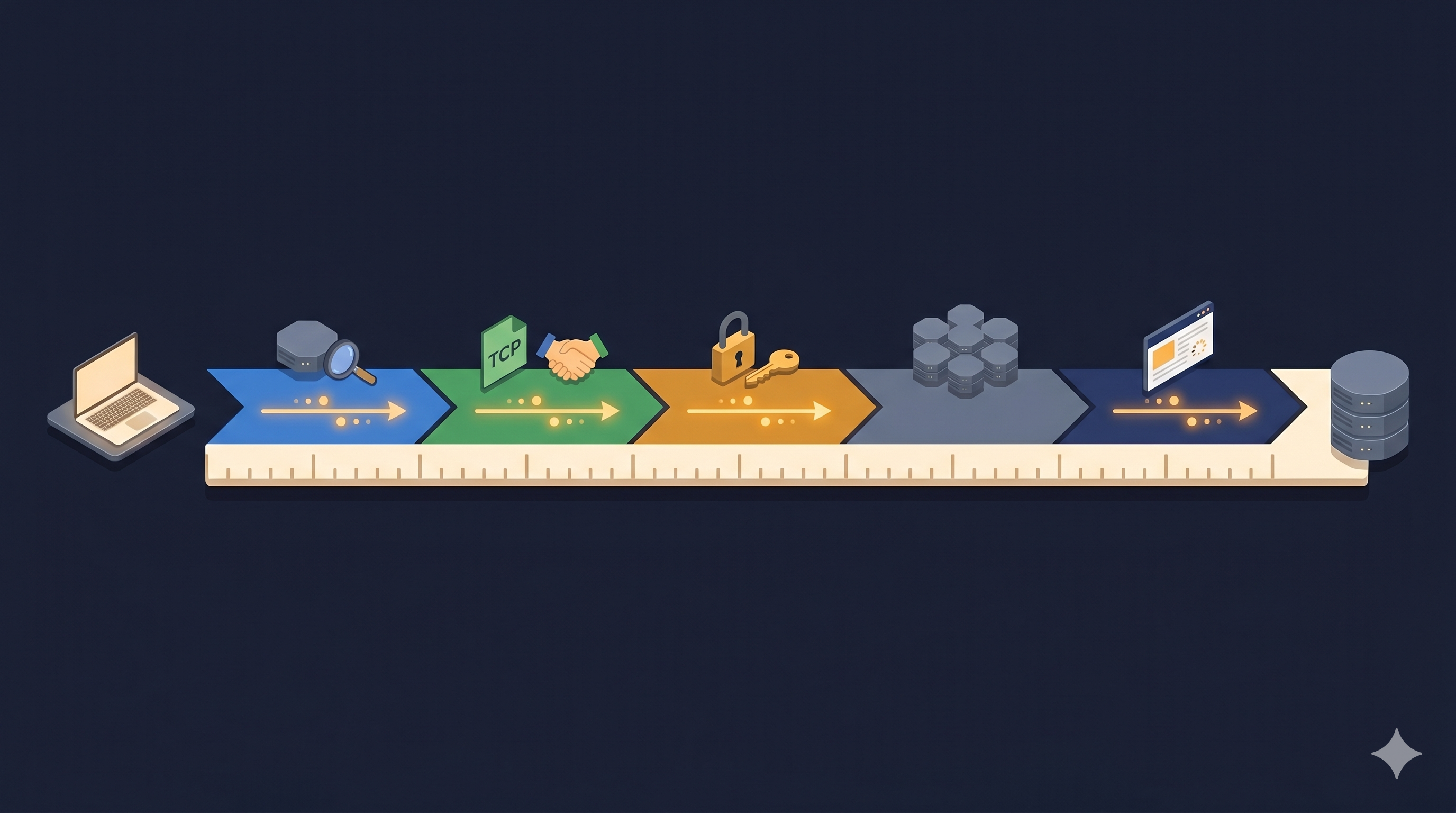
The latency of a full uncached HTTPS request, hop by hop:
| Hop | Operation | Typical latency |
|---|---|---|
| Browser | URL parse + cache check | < 1ms |
| DNS | Recursive resolution (uncached) | 20–120ms |
| DNS | OS/browser cache hit | ~0ms |
| TCP | 3-way handshake | 1 RTT (5–140ms) |
| TLS 1.3 | Handshake | 1 RTT (5–140ms) |
| HTTP | Request → Response (server processing) | 20–500ms+ |
| HTTP | Response → Render (client parsing) | 50–200ms |
| Total (best case, same-region) | ~50ms | |
| Total (worst case, cross-continent) | ~1,000ms+ |
This table should change how you think about optimization. The server processing time is often the smallest number in the chain. Network physics is usually the bottleneck.
CDNs, Proxies, and Load Balancers
Understanding these three types of infrastructure is essential because they sit between your users and your servers and change every performance characteristic discussed above.
Load Balancers
A load balancer distributes incoming requests across multiple servers. It sits at the entry point to your application tier and solves two problems: high throughput (spread the work) and fault tolerance (if a server dies, stop sending it traffic).
graph TD
    U[Users] --> LB[Load Balancer<br/>e.g. AWS ALB, nginx, HAProxy]
    LB --> A[App Server 1]
    LB --> B[App Server 2]
    LB --> C[App Server 3]
    A --> DB[(Database)]
    B --> DB
    C --> DB

    style LB fill:#334155,color:#f8fafc
    style DB fill:#334155,color:#f8fafc
Load balancers use different algorithms to decide which server gets each request:
- Round-robin — requests go to each server in rotation (simple, good enough for most cases)
- Least connections — requests go to whichever server has fewest active connections (better for requests with variable duration)
- IP hash — the same client IP always goes to the same server (useful when you need sticky sessions)
- Weighted — some servers get more traffic than others (useful when servers have different capacities)
Reverse Proxies
A reverse proxy sits in front of your application and acts on its behalf. It can:
- Terminate SSL (so your app servers don’t need certificates)
- Compress responses
- Cache static assets
- Rate-limit requests
- Strip or add headers
nginx, Caddy, and HAProxy are commonly used as reverse proxies. The difference from a load balancer is conceptual — a reverse proxy can do load balancing, but it also does these other jobs. In practice, the line is blurry: AWS ALB is a load balancer that also does SSL termination.
CDNs
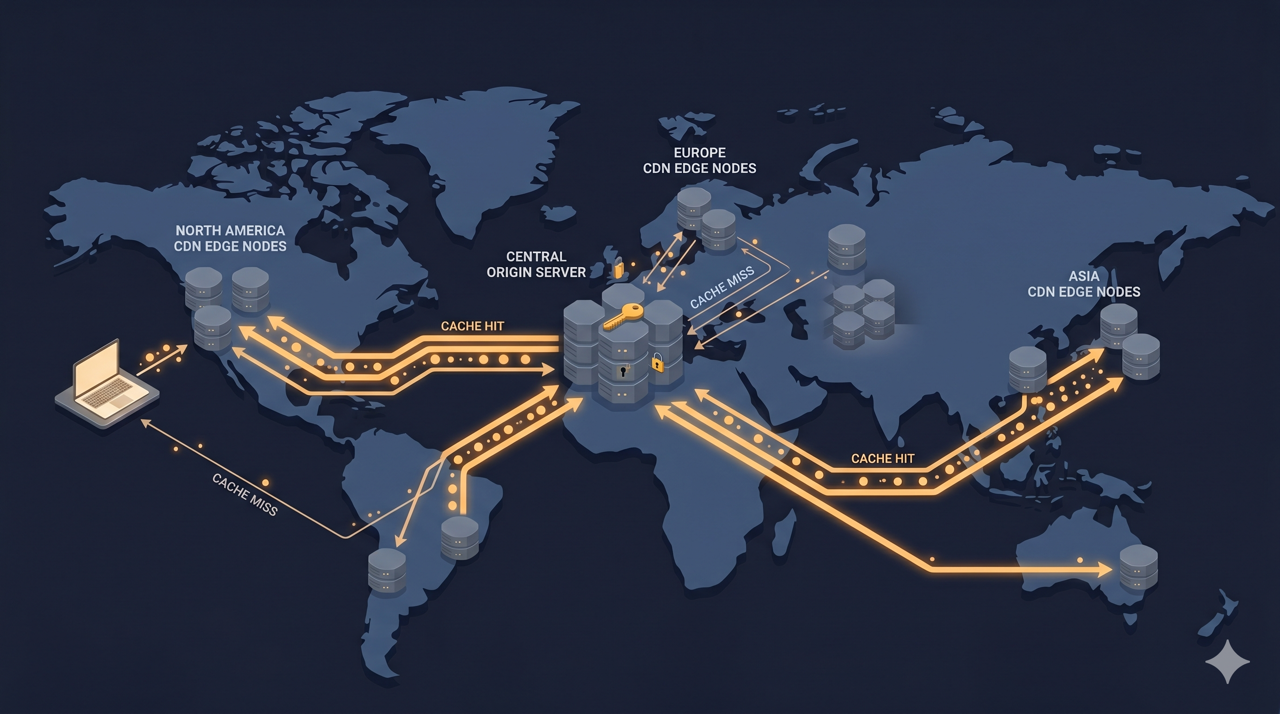
A CDN (Content Delivery Network) is a globally distributed network of servers, each called an edge node or PoP (Point of Presence). When you put your content behind a CDN, users get their responses from the closest edge node, not from your origin server.
Without CDN
With CDN
CDNs excel at serving static assets (images, CSS, JS, videos) that don’t change per-user. They can also cache API responses for read-heavy endpoints. And they provide DDoS mitigation by absorbing traffic at the edge before it reaches your origin.
Cloudflare, AWS CloudFront, Fastly, and Akamai are the major players. Cloudflare is the default choice for most teams — generous free tier, global network, and excellent DDoS protection included.
⚠️ Warning: CDNs cache aggressively by default. If you deploy a new version of your app and forget to invalidate the CDN cache, users get stale HTML/JS for minutes or hours. Always configure cache invalidation as part of your deployment pipeline.
Trade-offs & When This Matters
✅ Invest in understanding this when:
- You’re diagnosing unexplained latency (you need to know which hop is slow)
- You’re planning infrastructure for a new service
- You’re configuring a CDN or load balancer for the first time
- You’re designing APIs that will be consumed over mobile networks (high RTT = multiplied cost)
- You’re in a system design interview (this is the foundation everything else builds on)
❌ Don’t over-engineer this when:
- You have fewer than ~10,000 daily active users — the defaults work fine
- You’re building an internal tool — a CDN and multi-region setup is overkill
- Your latency problem is in your database or application code, not the network — adding CDN caching doesn’t fix a slow query
⚖️ The real trade-off
Every layer in this stack trades complexity for performance. DNS caching trades freshness for speed. TCP trades throughput for reliability. TLS trades latency for security. CDNs trade cache freshness for latency reduction.
The mistake most engineers make is treating this stack as binary: either you have a CDN or you don’t, either you use HTTPS or you don’t. The reality is that every layer is tunable — TTLs, cache-control headers, TLS session resumption, HTTP/2 server push, connection keep-alive settings — and the defaults are almost never optimal for your specific workload.
Most teams reach for more servers when they’re slow, when the actual problem is network topology. A server in Frankfurt that’s 250ms from Tokyo will feel slow at 5,000 req/s, but a CDN edge in Tokyo that’s 5ms away will feel instant at 50,000 req/s. That difference cost a configuration change, not engineering work.
Real-World Scenario: One Page Load, Every Hop
You’re building a SaaS booking platform — let’s call it Schedulr. A user in Sydney opens their browser and goes to https://app.schedulr.com/dashboard. Here’s every millisecond of that request:
Setup:
- Your origin servers are in AWS us-east-1 (Virginia)
- You’re using Cloudflare as your CDN
- Your DNS TTL is set to 300 seconds
- It’s a Tuesday morning, the user’s first visit of the day
The journey:
sequenceDiagram
    participant U as User (Sydney)
    participant B as Browser
    participant R as DNS Resolver (ISP)
    participant CF_DNS as Cloudflare DNS
    participant CF_Edge as Cloudflare Edge (Sydney PoP)
    participant Origin as Origin (AWS us-east-1)

    B->>R: Resolve app.schedulr.com (~10ms)
    R->>CF_DNS: Lookup (not cached) (~5ms)
    CF_DNS->>R: 104.21.x.x (Cloudflare anycast IP) (~1ms)
    R->>B: 104.21.x.x — cache for 300s (~1ms)
    Note over B,CF_Edge: Total DNS: ~17ms

    B->>CF_Edge: TCP SYN (~15ms RTT Sydney→CF Sydney)
    CF_Edge->>B: SYN-ACK
    B->>CF_Edge: ACK
    Note over B,CF_Edge: TCP established: ~15ms

    B->>CF_Edge: TLS 1.3 ClientHello (~15ms)
    CF_Edge->>B: ServerHello + Certificate + Finished
    B->>CF_Edge: Finished + HTTP/2 GET /dashboard
    Note over B,CF_Edge: TLS: ~15ms. HTTP request sent.

    CF_Edge->>Origin: Cache miss — fetch from origin (~160ms RTT)
    Origin->>CF_Edge: HTML response (gzipped, 24KB)
    CF_Edge->>B: HTML + cache headers (~15ms)
    Note over U,Origin: Total: ~237ms to first byte of HTML

    B->>CF_Edge: HTTP/2 GET /assets/app.js (cached at edge, ~15ms)
    B->>CF_Edge: HTTP/2 GET /assets/styles.css (cached at edge, ~15ms)
    B->>CF_Edge: HTTP/2 GET /api/user/me (not cacheable, ~175ms via origin)
    Note over U: Page interactive at ~450ms total
Now change one thing: the user was already on the site 60 seconds ago (DNS cached, TLS session resumed via session tickets). That 237ms to first byte drops to about 80ms, because:
- DNS: 0ms (cached in browser)
- TCP: 15ms (new connection — but HTTP/2 connection reuse would eliminate even this)
- TLS resumption (0-RTT): 0ms extra
- HTTP request + origin fetch: ~65ms
At 50,000 users/day, every 100ms saved at the edge is hundreds of thousands of seconds of user-perceived wait time eliminated. At that scale, these numbers matter commercially.
Common Mistakes Engineers Make
1. Ignoring DNS as a failure domain
DNS is treated as infrastructure that Just Works™ until it doesn’t. Most teams have no monitoring on DNS resolution times or failure rates, no runbook for DNS provider outages, and no plan to switch providers quickly.
Use two DNS providers with failover (Cloudflare + AWS Route 53, for example). Monitor resolution time from multiple global probes (UptimeRobot, Datadog Synthetics). Know your failover steps before you need them.
2. Setting TTLs too high to change them quickly
A 24-hour TTL is a 24-hour blast radius when something goes wrong. Teams set high TTLs for performance reasons and then discover they can’t do a fast failover during an incident.
The right pattern: keep a moderately high TTL (1 hour) normally, and reduce it to 60 seconds at least 24 hours before any planned DNS change. After the change is propagated and stable, raise it again.
3. Assuming HTTPS is free
TLS adds latency (one RTT handshake) and CPU overhead (cryptographic operations, though this is negligible on modern hardware). The bigger hidden cost is certificate management: expiration, rotation, validity chain issues. More than one engineering team has had an outage because a certificate expired at 3 AM on a Sunday.
Automate certificate renewal. Monitor expiration. Use wildcard certificates where appropriate. Never manually manage certificate rotation.
4. Conflating latency and throughput when diagnosing slowness
“The system is slow” is not a diagnosis. Before you add servers or caches, measure: is your p99 latency high (individual requests are slow)? Is your throughput low (the system can’t handle the volume)? The fixes are completely different.
Use distributed tracing (Jaeger, Datadog APM, AWS X-Ray) to see where time goes in each request. You’ll usually find that 80% of the latency is in one place — fix that place, not everything else.
5. Not configuring CDN cache headers correctly
Cloudflare and other CDNs respect Cache-Control headers from your origin. If your responses don’t include proper caching headers, the CDN can’t cache them, and you get no edge benefit — every request passes through to origin. Conversely, if you cache too aggressively, deployments don’t take effect immediately for users who get stale responses.
Set Cache-Control: public, max-age=31536000, immutable for fingerprinted assets (e.g. app.abc123.js). Set Cache-Control: no-store for personalized API responses. Set Cache-Control: public, max-age=300, stale-while-revalidate=60 for semi-static pages.
How This Shows Up in Interviews
System design interviewers use “How does the internet work?” as a diagnostic — not to test memorization, but to see whether you think in layers. The candidate who says “the browser sends a request to the server and gets a response back” has told the interviewer nothing about their reasoning ability. The candidate who walks through DNS, TCP, TLS, and HTTP/2 — and explains the latency cost of each hop — has demonstrated they understand infrastructure as a constraint on design.
What interviewers want is the ability to trace a request end-to-end and identify where performance problems could occur. When asked to design a system for a globally distributed user base, the top candidates immediately say things like: “We’ll need a CDN to bring assets close to users, which reduces the TCP+TLS round trips to single digits; the origin will only see cache misses.”
Common follow-up questions:
- “If a user in Singapore reports your app is slow, how would you diagnose it?” (Answer: check DNS resolution time, trace network path with
traceroute, check CDN hit rate, check origin response time — in that order.) - “How would you reduce time-to-first-byte for a globally distributed user base?” (CDN caching, edge compute for SSR, TCP connection reuse, HTTP/2 or HTTP/3.)
- “Why do we still use TCP if it’s slow? When would you use UDP instead?” (Reliability vs. latency. UDP for video/gaming/WebRTC where a dropped frame is better than a delayed one. TCP for anything where data integrity matters more than speed.)
Key Takeaways
- DNS is not magic — it’s a distributed database with caching and TTLs. Low TTLs give you flexibility; high TTLs give you performance. Choose based on how often you change DNS records.
- Every HTTPS request costs at minimum 2 RTTs before data flows — one for TCP, one for TLS. This is why CDN edge nodes matter: they bring the server 5ms away instead of 200ms.
- Latency and throughput are independent problems. Adding servers fixes throughput. Reducing hops, adding caching, and moving servers closer to users fixes latency. Confusing these leads to expensive, ineffective solutions.
- HTTP/2 multiplexing eliminated the N-connection hack — if you’re not using HTTP/2 or HTTP/3, you’re leaving significant page load performance on the table for asset-heavy applications.
- The slowest hop is usually not your application code. Network physics and architecture (DNS, TCP handshakes, uncached CDN misses) account for the majority of user-perceived latency in most production systems.
What to Learn Next
Now that you understand how data moves from browser to server and back, the natural next steps are:
- Latency Numbers Every Engineer Should Know — We referenced latency figures throughout this article; Article 6 gives you the full reference table for every hardware layer from L1 cache to cross-continental network — numbers you’ll use to sanity-check every design decision.
- CDN Architecture — Article 19 goes deep on how CDNs work internally — cache invalidation strategies, origin shielding, edge compute, and when a CDN becomes a liability instead of an asset.
- Vertical vs Horizontal Scaling — Article 3 picks up where this article leaves off: now that you know what load balancers do, Article 3 explains when you need them and how to design your application to work behind one.
Topics covered